Repository navigation
STM32_Programmer.sh not found #63
Description
STM32_Programmer.sh is in /usr/local/STMicroelectronics/STM32Cube/STM32CubeProgrammer/bin and this folder is added to the path. I can run STM32_Programmer.sh in the terminal with no issues.
However, Arduino IDE complains that STM32_Programmer.sh was not found.
When I checked, the PATH inside stm32CubeProg.sh was different from the one in the terminal.
I even changed $HOME to /usr/local in stm32CubeProg.sh but the error is still the same.
Activity
fpistm commentedon May 2, 2020
Seems strange.
Which version of Arduino IDE you used?
Coud you echo the $PATH in the stm32CubeProg.sh
bsamadi commentedon May 2, 2020
version: 1.8.12
PATH in
stm32CubeProg.sh:/snap/arduino/14/java/bin:/snap/arduino/14/usr/sbin:/snap/arduino/14/usr/bin:/snap/arduino/14/sbin:/snap/arduino/14/bin:/usr/local/sbin:/usr/local/bin:/usr/sbin:/usr/bin:/sbin:/bin:/usr/games:/usr/local/gamesfpistm commentedon May 2, 2020
So STM32cubeprogrammer is not in the path.
How you launch the IDE?
bsamadi commentedon May 2, 2020
The PATH that I showed is at the beginning of
stm32CubeProg.sh, coming from the echo $PATH command in this picture:One issue is that this PATH is different from the PATH in the user environment.
The other issue is that I modified
stm32CubeProg.sh(see the above picture) and added the installation folder ofSTM32_Programmer.shto the PATH. However, I still get this error:I have installed Arduino IDE through "Software" in Ubuntu and I run it from the start menu. I also tried running it from the terminal. In both cases, the PATH in
stm32CubeProg.shis different from the PATH defined in the user environment. I am wondering wherestm32CubeProg.shgets its PATH.The
command -v STM32_Programmer.shcommand works fine in the terminal:fpistm commentedon May 2, 2020
Try to launch arduino from the terminal.
fpistm commentedon May 2, 2020
From:
https://help.ubuntu.com/community/EnvironmentVariables
Lauching from desktop application has a different env.
That's why it's not work. So add it as explained.
bsamadi commentedon May 2, 2020
It seems that the issue originates from the fact that Ubuntu installs Arduino IDE using snap. This is how PATH is defined in snap (https://snapcraft.io/docs/environment-variables):
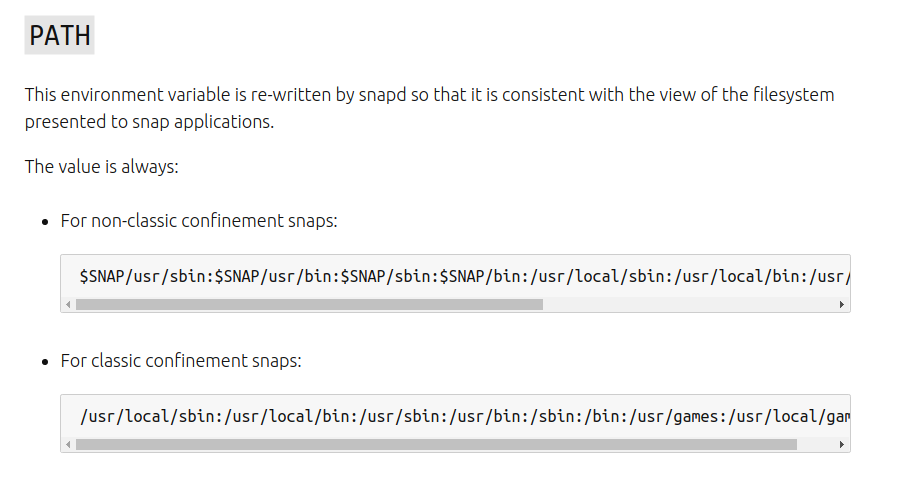
If you want to use STM32duino, do not install Arduino IDE through Software in Ubuntu or
snap.Thank you @fpistm for your time!
fpistm commentedon May 2, 2020
Ok , anyway you need to have the cube programmer in the path. There is no bug. This works as expected and warn user that it cannot be found.
bsamadi commentedon May 2, 2020
It would be great if a new user could follow these steps to use STM32duino:
Softwarein Ubuntu/usr/local/STMicroelectronics/STM32Cube/STM32CubeProgrammer)Currently, there are two issues with this workflow:
stm32CubeProg.shdoesn't findSTM32_Programmer.shin PATH, it looks for it in$HOME/STMicroelectronics/STM32Cube/STM32CubeProgrammer/binnot the default installation path, which is:/usr/local/STMicroelectronics/STM32Cube/STM32CubeProgrammer/bin.fpistm commentedon May 4, 2020
@bsamadi
As far as I can tell is this is not the default location.
Yes, so up to end user to provide the correct environment.
Yes, as it is the default path as far as I can tell.
How did you install the CubeProgrammer?
bsamadi commentedon May 4, 2020
@fpistm, I checked again. You are absolutely right. I had changed the default installation folder. STM32duino works just fine. My main problem was the Arduino IDE installed by snap.
Thank you!
fpistm commentedon May 4, 2020
Welcome.
Thanks to have checked again.
About snap it is fine to be aware of this issue.
Diatrix commentedon May 15, 2020
@bsamadi What was your solution then? Uninstall the Arduino IDE and reinstall it though command line?
bsamadi commentedon May 16, 2020
Yes, I followed the instructions here.
ggatis commentedon Aug 17, 2021
Or change file stm32CubeProg.sh:
line
export PATH="$HOME/STMicroelectronics/STM32Cube/STM32CubeProgrammer/bin":$PATH
to
export PATH="/usr/local/STMicroelectronics/STM32Cube/STM32CubeProgrammer/bin":$PATH
blaisegassend commentedon Feb 11, 2024
I noticed that when running from arduino in a snap, HOME is set to:
/home/my_user_name/snap/arduino/85
By installing STMicroelectronics into /home/my_user_name/snap/arduino/85 instead of /home/my_user_name, the snap version of arduino was able to find it just fine.
You can probably do this automatically by running
snap run --shell arduino
and running SetupSTM32CubeProgrammer-2.15.0.linux from there. Or you can just install normally and copy/move.
rtek1000 commentedon Jan 27, 2025
The problem is caused when installing SetupSTM32CubeProgrammer-x.xx.x.linux using sudo or root. If installed without elevation, it will be installed in the user's home.
Wrong:
Path: /usr/local/STMicroelectronics/STM32Cube/Correct:
Path: /home/user/STMicroelectronics/STM32Cube/